Can You Send a Rent Increase Notice Digitally?

Yes, most landlords can send a rent increase notice digitally, provided the tenant consented to electronic delivery and local law doesn’t require physical service for the increase amount involved. Certified mail is still the fallback when consent is missing or a jurisdiction demands it. The digital rent increase notice process only holds up in a dispute if you can prove the tenant received it, so treat proof of delivery as seriously as the notice itself.
Do this now, before you send anything:
- Confirm the notice period your lease and state require (30, 60, or 90 days).
- Verify the tenant gave written consent to electronic notices, either in the lease or a separate form.
- Generate a dated, signed PDF with the current rent, new rent, and effective date.
- Log the delivery method and timestamp the moment you send it.
A tool like LandlordForms can generate state-aware notices and capture those timestamps automatically, which matters more than most landlords realize until they need the record.
Key Takeaways
A defensible digital rent increase notice process depends on documented tenant consent, exact statutory timing, and a delivery record that survives a dispute months later.
| Point | Details |
|---|---|
| Confirm consent first | Electronic delivery only holds up if the tenant consented in writing before the notice was sent. |
| Match timing to jurisdiction | Standard increases often need 30 days; larger increases can require 60 or 90 days under state rules. |
| Rank delivery channels by proof | Portal view receipts beat email receipts, which beat unconfirmed sends. |
| Freeze the ledger at generation | A snapshot at notice creation prevents later payments from undermining the notice’s accuracy. |
| Automate with LandlordForms | State-aware templates, a rent calculator, and delivery logging remove the manual steps most prone to error. |
Table of Contents
- When Is a Digital Rent Increase Notice Process Legally Acceptable?
- What Goes Into the Notice, and How Much Notice Do You Actually Owe?
- How Do You Deliver a Digital Notice So It Holds Up?
- How Do Rent-Control Laws Change Your Notice Process?
- Building a Repeatable Digital Notice Workflow
- What a Compliant Notice Template Actually Needs
- Why the Ledger Freeze Is the Detail Everyone Skips
- Automate the Digital Rent Increase Notice Process With LandlordForms
- Sources
- FAQ
When Is a Digital Rent Increase Notice Process Legally Acceptable?
Electronic delivery works when two conditions line up: the tenant agreed to it, and no local rule overrides that agreement for this specific increase. Miss either one, and an email or portal message may not count as valid notice at all.
Many states allow email, tenant portal messages, or e-signature platforms as valid delivery if the tenant previously consented in writing, either through a clause in the signed lease or a standalone consent form. That consent has to predate the notice. You can’t email a rent increase and ask for retroactive permission to have emailed it.
Here’s where it gets tricky: a state can generally permit electronic notices while a city ordinance still requires certified mail or personal service for increases above a certain percentage. Rent-controlled units are especially prone to this overlap. Washington’s landlord-tenant statute lays out notice-period and communication requirements that interact with delivery method in ways a general “electronic notice is fine” assumption won’t catch.
Three ways to document tenant consent so it survives a dispute:
- A dedicated clause in the lease naming acceptable electronic channels (email address, portal login).
- A standalone consent form signed at move-in, separate from the lease.
- A recorded portal opt-in with a timestamp, stored outside the portal itself in case access changes later.
Pro Tip: Never rely on “the tenant always opens the portal” as your consent record. Get it in writing before you need it, not after a tenant claims they never saw the notice.
What Goes Into the Notice, and How Much Notice Do You Actually Owe?
A rent increase notice needs nine pieces of information to be defensible, and skipping any one of them gives a tenant grounds to challenge the whole thing.
- Tenant’s full legal name as it appears on the lease
- Unit address, including unit number if applicable
- Current monthly rent
- New monthly rent
- Effective date of the increase
- Reference to the original lease (date signed, lease ID if you track one)
- Response deadline, if your state requires tenant acknowledgment
- Landlord or property manager contact information
- Signature and date of notice issuance
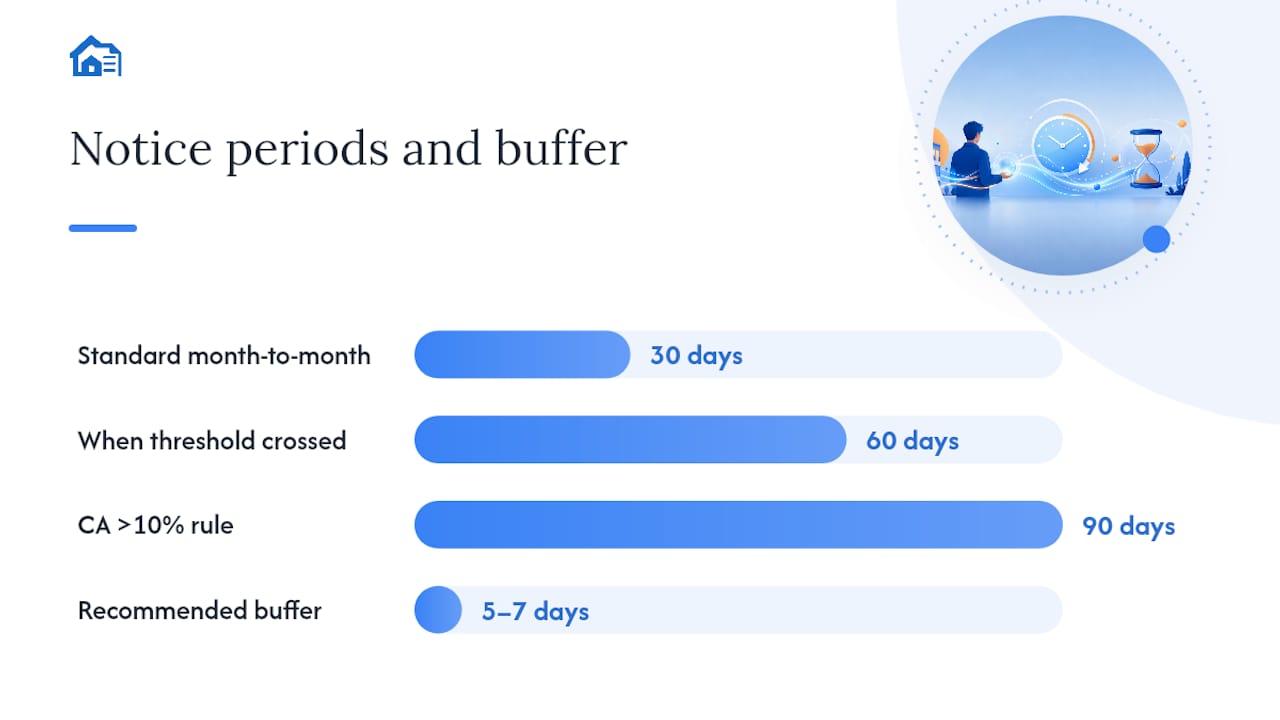
Timing depends on your state and the size of the increase. Month-to-month tenancies commonly require 30 days’ notice for standard increases, but that number jumps to 60 or even 90 days once the increase crosses a set threshold, or in jurisdictions that mandate longer windows regardless of amount. California’s civil code requires 90 days’ notice for increases above 10 percent in a 12-month period, which catches landlords who assume 30 days is a universal floor.
Calculate your effective date backward from the notice period, then add a buffer. If your state requires 60 days and you send the notice on the 58th day before the intended change, a single delivery hiccup can void the timing entirely. Build in a five-to-seven-day cushion, especially if you’re relying on certified mail as a backup channel. Rent-cycle alignment matters too: an effective date that lands mid-cycle instead of on the first of the month creates prorated math that confuses tenants and invites disputes.
How Do You Deliver a Digital Notice So It Holds Up?
Not all digital channels carry the same weight in a dispute. Rank them by the strength of the proof they generate, not by convenience.

A resident portal with a view receipt is the strongest option, because it timestamps when the tenant actually opened the document, not just when you sent it. Registered email with a server-side read receipt ranks second. Standard e-signature platforms that capture acknowledgment come next, since they prove the tenant interacted with the document even if they didn’t formally “view” it in a portal.
Save this metadata for every notice you send, without exception:
- Sent timestamp and the message ID or send log from your email or portal system
- The PDF version ID, so you can prove which exact document went out
- Open or view receipt, if the platform supports it
- Signed acknowledgment, when the tenant provides one
- Tracking number, if you follow up with certified mail
Digital consent should live somewhere retrievable alongside the notice itself, not buried in an old email thread, according to Avail’s guidance on rent increase notices.
If a tenant doesn’t open the portal message or the email bounces, don’t wait out the clock hoping it resolves itself. Re-send once within 48 hours, and if there’s still no confirmed receipt, switch to certified mail immediately. Document every attempt, including failed ones. A folder with three failed portal notifications and one successful certified mail receipt tells a much better story in a dispute than a single email you’re hoping counts.
How Do Rent-Control Laws Change Your Notice Process?
Rent-cap jurisdictions don’t just limit how much you can raise rent. They often change how the notice has to look and how it has to be delivered.
California’s Tenant Protection Act, AB 1482, caps annual increases for covered units at CPI plus 5 percent, up to a maximum of 10 percent. That’s a hard ceiling most rent calculators need to check against before generating a number, and it applies regardless of what your lease’s escalation clause says. New York operates through a separate framework: rent-stabilized units follow allowable increase percentages and registration requirements published by the state’s Homes and Community Renewal agency, and those units often require specific notice language that a generic template won’t include. Oregon caps increases statewide with a similar CPI-linked formula, and several cities layer additional local ordinances on top of state rules.
Automated calculators are fast, but speed isn’t the same as accuracy. A rent-cap formula that’s correct for a standard unit can be dead wrong for one still covered by a prior rent-control registration, an inherited tenancy protection, or a local ordinance the statewide cap doesn’t override.
A few practical notes for landlords operating in capped markets:
- Some cities require landlords to register rent-controlled units annually before issuing any increase.
- Local housing authorities often publish increase calculators or lookup tools specific to that jurisdiction, and it’s worth checking those before trusting a national tool.
- A local rent-control guide like this one covering Berkeley illustrates how much city-specific detail can sit underneath a state-level cap.
Run any automated increase amount through a manual check whenever the unit sits inside a capped jurisdiction. The formula might be right for 95 percent of units and wrong for the one that gets you a fair-housing complaint.
Building a Repeatable Digital Notice Workflow
Notice disputes rarely come from bad math. They come from records that shifted after the fact, someone applying the wrong state’s rules, or nobody being able to prove what was sent and when.
Three habits fix most of that:
- Freeze the ledger at the moment you generate the notice. The charge breakdown cited in the notice should reflect a snapshot, not a live balance. If a late fee posts or a partial payment lands the next day, the frozen record stays the legal reference point for that specific notice.
- Keep a centralized, state-aware rules table. Notice periods, cap formulas, and required language blocks change by state and sometimes by city. A shared reference table prevents someone from applying last year’s 30-day rule to a unit that now needs 90.
- Test every delivery path before you rely on it. Send a dummy notice through your portal and email system to confirm timestamps, message IDs, and read receipts are actually capturing correctly, not just assumed to be.
| Workflow Step | What It Prevents |
|---|---|
| Ledger snapshot at generation | Later payments or adjustments altering the notice’s accuracy |
| State rules lookup before drafting | Applying the wrong notice period or missing required language |
| Delivery metadata logging | Disputes over whether the tenant received the notice |
| Immutable record attached to lease | Losing proof of delivery when staff or systems change |
Routing notices through a state rules lookup, merging the correct language into a signed PDF, and logging delivery metadata directly to the lease record is the same pattern described in operational research on automating rent notices, and it holds whether you’re managing four units or 140.
Pro Tip: Attach the frozen ledger snapshot to the notice record itself, not just to the tenant’s account. If the ledger updates later, you still have the exact figures the tenant was legally notified of.
The immutable record matters most when a tenant disputes the amount six months later. If your only proof is a live ledger that’s since changed, you’re arguing from memory. If it’s a snapshot dated to the notice, you’re arguing from evidence.
What a Compliant Notice Template Actually Needs
A template is only as good as the checklist behind it. Run through these steps in order every time:
- Verify the jurisdiction’s current rules for notice period and cap amount.
- Run the increase through a rent calculator to confirm it doesn’t exceed any applicable cap.
- Generate a dated PDF with a signature block.
- Capture the tenant’s delivery consent and, once sent, the delivery receipt.
- Log the delivery method, timestamp, and tracking number to the lease record.
Field-level phrasing that holds up in most jurisdictions:
- “This notice informs you that your monthly rent for [unit address] will increase from [current rent] to [new rent], effective [date].”
- “This increase is issued under the terms of your lease dated [lease date].”
- “Questions or objections should be directed to [contact] no later than [response deadline].”
Once a tenant accepts the increase or the response window closes without objection, update your rent-collection settings and the ledger to reflect the new amount starting on the effective date, not before. A rent increase notice template and a paired rent increase calculator handle most of this sequence without manual drafting.
Why the Ledger Freeze Is the Detail Everyone Skips
The most common dispute I’ve seen traced back to one thing: a landlord sent a correct notice, then a late fee or partial payment changed the ledger before the tenant’s response window closed. The tenant pointed to the new balance and claimed the notice was wrong. It wasn’t. But without a frozen snapshot, there was nothing to point to except a shifting number.
Freezing the ledger at generation isn’t a nice-to-have step tucked into a workflow diagram. It’s the single change that turns “I think this is what we sent” into a document you can hand a judge.
— Igor
Automate the Digital Rent Increase Notice Process With LandlordForms
Landlordforms turns the checklist above into a few clicks instead of a spreadsheet you rebuild every time rent goes up. The Rent Increase Calculator checks your new amount against state and local caps before you generate anything, and the Rent Increase Notice template fills in the required fields, dates, and signature block automatically, so you’re not retyping lease references at 9 p.m. on a Tuesday.

Every notice you generate gets a timestamped delivery log and a frozen ledger snapshot attached to the lease record, the exact combination this guide walks through, minus the manual assembly. If you’re managing more than a handful of units, that snapshot alone can save you from a dispute that costs far more than a subscription. Start with the rent ledger template to see how the freeze works in practice, or run a sample increase through the rent proration calculator if your effective date lands mid-cycle.
Sources
FAQ
How much notice do landlords typically give for rent increases?
Most states require at least 30 days’ notice for month-to-month tenancies, but increases above a certain percentage often require 60 or 90 days depending on state law.
Can a landlord raise rent $300 in New York?
It depends entirely on whether the unit is rent-stabilized. Market-rate units generally have no dollar cap, while stabilized units follow allowable percentage increases set through New York’s HCR guidance, so a flat rent increase figure means nothing without knowing which category applies.
How much notice does a landlord need to give in Colorado for a rent increase?
Colorado generally requires at least 60 days’ written notice for month-to-month tenancies before a rent increase takes effect, though local ordinances can extend that window.
How much notice is required for a rent increase in Washington State?
Washington law generally requires at least 60 days’ written notice for rent increases on month-to-month tenancies, and the notice must meet the communication requirements laid out in the state’s landlord-tenant statute.
Does LandlordForms handle rent-control caps automatically?
Yes, the Rent Increase Calculator checks proposed increases against known state and local caps before generating the notice, though units under active local registration should still get a manual review.