Free Rental Property Expense Spreadsheet for Landlords

A free, Schedule E–compatible rental property expense spreadsheet is available for immediate download in Excel, Google Sheets, and printable CSV formats. The Landlordforms rent ledger template is the recommended starting point for most landlords: it’s free, maps directly to Schedule E lines, and handles per-property tracking out of the box.
Download options:
- Excel (.xlsx) — preserves formulas, works offline, best for most landlords
- Google Sheets (copy to Drive) — automatic cloud backup, multi-device access
- CSV/printable — manual entry or import into accounting software
- Zillow’s free rental income and expense worksheet — Excel-based, auto-totaling, good for single-property owners
- AllPropertyManagement’s spreadsheet — downloadable with a built-in usage guide
Recommended pick: The Landlordforms rent ledger template in Excel. It’s Schedule E–friendly, free, and built for landlords managing 1 to 150 units.
Key Takeaways
A free, Schedule E–aligned rental property expense spreadsheet, used consistently with per-property tabs and monthly reconciliation, is all most small landlords need to stay tax-ready year-round.
| Point | Details |
|---|---|
| Download the free template | The Landlordforms rent ledger template is free, works in Excel and Google Sheets, and maps to Schedule E. |
| Track per-property totals | Schedule E requires separate income and expense reporting per property — set up one tab per address from day one. |
| Reconcile monthly | Match every spreadsheet entry to your bank statement each month to catch errors before tax season. |
| Map to Schedule E | Spreadsheet category totals feed directly into Schedule E lines; depreciation flows through Form 4562. |
| Landlordforms upgrade path | The free template handles 1–3 properties; the paid subscription adds automation and document storage for larger portfolios. |
Table of Contents
- Which file format works best for your rental expense spreadsheet?
- What your rental income and expense spreadsheet should track
- Common expense categories every landlord should record
- How to use the spreadsheet step by step
- What to review each month to catch problems early
- Practical tips that make tracking faster and more reliable
- How your spreadsheet maps to Schedule E and depreciation
- Spreadsheet vs. property management software: which do you need?
- How to customize categories for your tax situation
- Sample monthly and yearly reporting views
- Fixing the most common spreadsheet errors
- Why simple spreadsheets still work for most small landlords
- Landlordforms makes rent tracking free and audit-ready
- Sources
- FAQ
Which file format works best for your rental expense spreadsheet?
The format you choose shapes how much time you spend maintaining the file each month.
Excel (.xlsx) is the strongest choice for most landlords. Formulas survive copy-paste, conditional formatting works without a browser, and you can open it without an internet connection. If your accountant or CPA uses Excel, handing off the file at year-end takes seconds.
Google Sheets wins on convenience when you manage properties from multiple devices or want automatic version history. Every edit saves instantly to Google Drive, so a crashed laptop doesn’t cost you a year of records. The Landlordforms templates page includes a Google Sheets copy option alongside the Excel download.
CSV is the right call only if you plan to import transactions into QuickBooks, Wave, or another accounting tool. It strips formulas and formatting, so it’s a data-transfer format, not a working ledger.
The download typically includes: a single master transaction log, per-property tabs (one tab per address), a mileage and receipts tracker, a depreciation worksheet, and a year-to-date totals summary. Most landlords with two or more properties should activate the per-property tabs immediately.
What your rental income and expense spreadsheet should track
The columns you set up on day one determine how clean your records are at tax time. Here’s the structure that maps cleanly to Schedule E without extra work later.
| Column | What to Enter | Schedule E Line |
|---|---|---|
| Date | Payment or expense date | All lines |
| Property address | Full address or short code | Per-property section |
| Unit | Unit number (if multi-unit) | Per-property section |
| Category | Expense type (see Section 4) | Varies by category |
| Subcategory | Detail (e.g., plumber, HVAC) | Repairs & maintenance |
| Payee/vendor | Contractor or company name | Audit trail |
| Amount | Dollar amount paid | All lines |
| Payment method | Check, ACH, credit card | Reconciliation |
| Tax-deductible | Yes / No | Deductible expenses |
| Receipt attached | Yes / No | Record retention |
| Notes | Brief description | Audit support |
The sheet structure that works best for most landlords: one master log where every transaction gets entered, plus separate tabs that pull per-property totals automatically. Schedule E requires you to report income and expenses separately for each property, so per-property tabs aren’t optional once you own more than one rental.
Common expense categories every landlord should record
Operating expenses are the bread and butter of Schedule E deductions. These include repairs and maintenance (plumber visits, appliance fixes, paint), utilities you pay on behalf of tenants, property insurance, property management fees, advertising costs, supplies, HOA fees, landscaping, and pest control. The IRS requires that these expenses be ordinary and necessary for your rental activity to qualify as deductible.
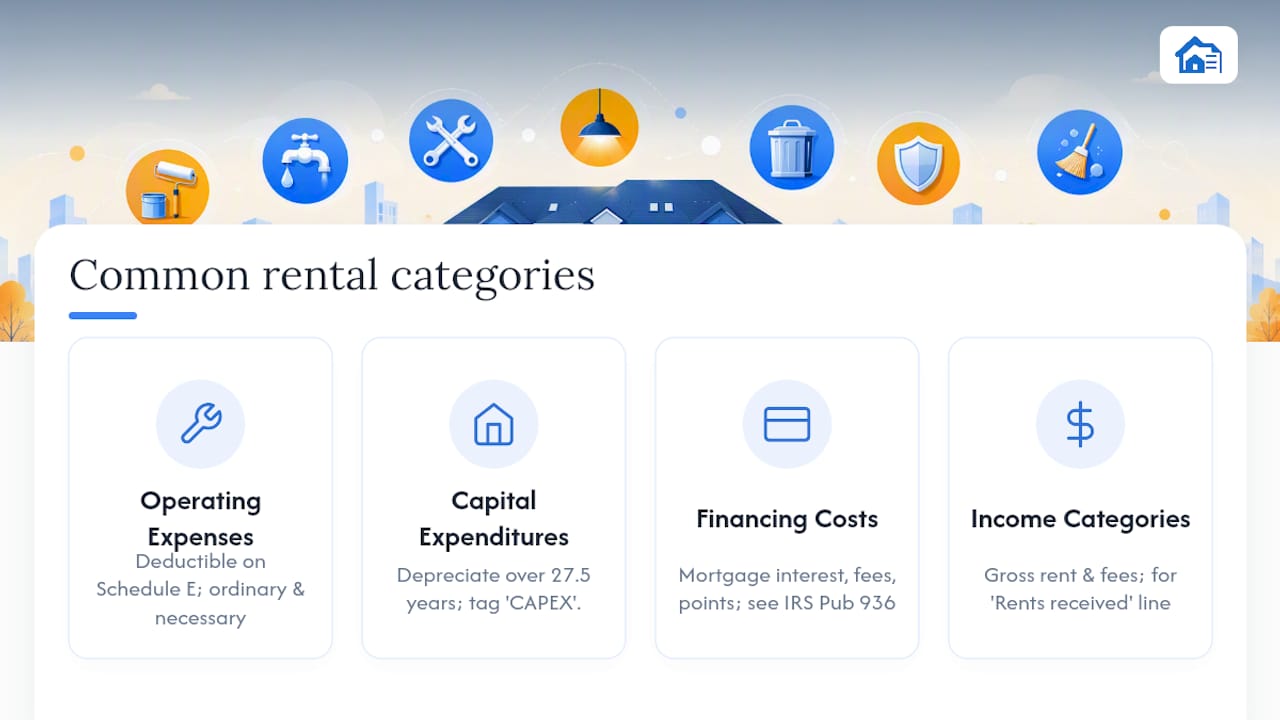
Capital expenditures are a different animal. A roof replacement, full kitchen renovation, or new HVAC system isn’t deductible in the year you pay for it. Instead, it gets depreciated over its useful life, typically 27.5 years for residential rental property improvements. Track these in a separate column or tab so they don’t accidentally land in your operating expense totals.
Financing costs to track: mortgage interest (deductible on Schedule E via IRS Publication 936 rules), loan origination fees, and any points paid. These are among the largest deductions most landlords have.
Income categories belong in the same spreadsheet. Track gross rent collected, late fees, pet fees, parking fees, and any other tenant charges separately. You’ll need these totals for the “Rents received” line on Schedule E.
Pro Tip: Flag every capital expenditure with a “CAPEX” tag in your notes column the moment you enter it. Mixing a $12,000 roof into your repairs line is one of the most common audit triggers for rental property owners.
How to use the spreadsheet step by step
Setup (one time, under 30 minutes)
- Download the Excel file or make a copy in Google Sheets.
- Enter each property’s address in the property tab headers.
- Set your default expense categories using the dropdown lists (more on customizing these in Section 10).
- If you’re mid-year, enter opening balances or import prior-year totals into the year-to-date row.
- Add recurring rows for fixed monthly costs: mortgage payment, insurance premium, and any management fees.
Weekly habit
- Enter every expense the day you pay it or within 48 hours. Date, property, category, amount, payee, receipt attached: yes or no.
- Log rent deposits when they hit your account. Note partial payments or late fees separately.
Monthly routine
- Reconcile the spreadsheet against your bank and credit card statements. Every line item should match a real transaction.
- Verify that receipts are attached (scanned or photographed) for every expense over $75.
- Run per-property totals and do a quick profit/loss check. If a property’s expense ratio jumps unexpectedly, you want to catch it in month two, not month twelve.
Year-end prep
- Export per-property totals to fill Schedule E. Each property gets its own column on the form.
- Run the depreciation worksheet and transfer figures to Form 4562.
- Back up the completed file with a timestamped copy before handing it to your CPA.
The AllPropertyManagement spreadsheet guide walks through similar monthly steps and is worth reading alongside this workflow.
What to review each month to catch problems early
Monthly reviews don’t need to take long. Four numbers tell you most of what you need to know.

Gross rent collected vs. scheduled rent shows vacancy loss immediately. If you collected $1,800 of $2,000 scheduled, you have a $200 vacancy or partial-payment issue to resolve.
Net operating income (NOI) is gross rent minus all operating expenses, excluding mortgage payments. Tracking NOI monthly shows whether a property is genuinely profitable before debt service.
Expense ratio (total operating expenses divided by gross rent) is the fastest health check.
Maintenance trend is easy to spot when you filter your master log by category. Three plumbing calls in four months on the same unit is a pattern, not bad luck.
To build a monthly summary view without a pivot table, add a summary tab with SUMIF formulas that pull totals by property and category. Something like =SUMIF(MasterLog[Property],"123 Main St",MasterLog[Amount]) gives you per-property totals in seconds. If you’re comfortable with pivot tables, insert one from the master log and group by property, then by category.
Practical tips that make tracking faster and more reliable
- Use one bank account per rental portfolio. Mixing personal and rental transactions is the single biggest source of reconciliation errors. A dedicated checking account means every transaction in the account belongs in the spreadsheet.
- Standardize vendor names. Enter “ABC Plumbing” the same way every time, not “ABC Plumbing LLC,” “ABC Plumb,” and “ABC.” Inconsistent names break filters and make year-end sorting painful.
- Set up data validation dropdowns for your category column. In Excel: Data → Data Validation → List. In Google Sheets: Data → Data Validation → Dropdown. This prevents “Reparis” from hiding in your repairs total.
- Record on a cash basis (the date you actually paid) unless your accountant specifically recommends accrual. Cash basis aligns with how most individual landlords file and matches your bank statements.
- Keep a single master receipt folder in Google Drive or Dropbox, organized by year and property. Name files consistently:
2026_123MainSt_Plumbing_ABC_$450.pdf. Finding a receipt during an audit takes 30 seconds instead of 30 minutes.
Pro Tip: Schedule a 20-minute “landlord bookkeeping” block every Sunday. Entering five to ten transactions weekly is far less painful than reconstructing three months of expenses in April.
Backup strategy: Google Drive auto-saves Sheets copies. For Excel files, set a monthly calendar reminder to export a timestamped ZIP to an external drive or cloud folder. The Landlordforms guide on audit-proof documentation covers what records to keep and for how long.
How your spreadsheet maps to Schedule E and depreciation
Schedule E (Form 1040) is where rental income and deductible expenses are reported per property. Your spreadsheet category totals map to Schedule E lines as follows:
- Rents received → Line 3 (gross rent collected)
- Advertising → Line 5
- Auto and travel → Line 6
- Cleaning and maintenance → Line 7
- Insurance → Line 9
- Mortgage interest → Line 12 (see Publication 936 for deductibility rules)
- Taxes → Line 16 (property taxes)
- Depreciation → Line 18 (from Form 4562)
Depreciation deserves its own tab in the spreadsheet. Residential rental property depreciates over 27.5 years using the straight-line method. A property with a $275,000 cost basis (land excluded) generates $10,000 in annual depreciation. That figure flows to Form 4562, then to Schedule E Line 18, then to Form 1040.
The IRS expects you to keep records supporting every deduction for at least three years from the filing date, and longer for property records tied to depreciation. Receipts, bank statements, and lease agreements are the minimum. The Landlordforms payment records guide covers retention timelines in detail.
Spreadsheet vs. property management software: which do you need?
A spreadsheet is enough if:
- You manage 1–3 properties
- Bookkeeping takes under two hours per month
- You don’t need automatic bank imports or receipt OCR
- Your CPA handles the Schedule E transfer at year-end
Consider moving to software when:
- You have 4+ properties and reconciliation is eating your weekends
- You want automatic transaction imports from your bank
- You need receipt scanning, tenant portals, or maintenance tracking in one place
- You’re generating enough rental income that errors carry real tax risk
| Capability | Spreadsheet | Automation software |
|---|---|---|
| Cost | Free | Monthly subscription |
| Bank imports | Manual | Automatic |
| Receipt storage | External folder | Built-in or integrated |
| Per-property scaling | Manual tabs | Automatic |
| Schedule E export | Manual transfer | Often automated |
| Setup time | Under 30 minutes | Hours to days |
For landlords in the middle, the Landlordforms rent ledger template is the right bridge. It’s free, handles per-property tracking cleanly, and the paid subscription adds automated reminders, document centralization, and receipt storage without forcing you to abandon the template workflow you already know.
How to customize categories for your tax situation
The default categories in most free templates cover the Schedule E lines that apply to most landlords. But your situation may require additions.
State and local taxes: Some states impose additional landlord-specific taxes or fees (business license fees, rental registration fees) that don’t map to a standard Schedule E line. Add a custom row labeled with the specific tax name and mark it as deductible. Your CPA will know where it lands on your state return.
Short-term rental expenses: If you rent on Airbnb or VRBO, you’ll need subcategories for platform fees, linens, toiletries, and cleaning between guests. These are still operating expenses, but the detail helps at tax time.
Home office or mixed-use: If you manage rentals from a dedicated home office, you may be able to deduct a portion of home expenses. Track those separately with a “home office” category and calculate the deductible percentage with your accountant.
To add a custom category in Excel, go to your data validation list, click Edit, and add the new category name. In Google Sheets, open the dropdown rule and add a new item. Keep the list short: ten to fifteen categories is manageable; thirty is noise.
Sample monthly and yearly reporting views
A monthly view should answer one question at a glance: did each property make money this month?
Monthly summary tab structure:
- Row 1: Property addresses as column headers
- Row 2: Gross rent collected
- Row 3: Total operating expenses (sum of all deductible categories)
- Row 4: NOI (Row 2 minus Row 3)
- Row 5: Mortgage payment (tracked but not an operating expense)
- Row 6: Cash flow after debt service (Row 4 minus Row 5)
Yearly view adds a column for each month and a YTD total column on the right. By December, you can read across a single row to see how insurance costs trended, whether maintenance spiked in summer, and what your total depreciation deduction will be.
A simple way to build the yearly view: copy your monthly summary tab twelve times, label each tab by month, then create a “Year Summary” tab that pulls each property’s NOI from each monthly tab using a direct cell reference. No pivot table required.
Fixing the most common spreadsheet errors
Formulas returning #REF! or #VALUE! Usually caused by deleting a row or column that a formula references. Check the formula bar, trace the reference, and restore the deleted range or update the formula to point to the correct cells.
Totals not matching bank statements. Filter the master log by month and property, then compare the filtered total to your bank statement line by line. The mismatch is almost always a duplicate entry or a transaction entered under the wrong property.
Category dropdown not showing new options. In Excel, the data validation list range needs to include the new row. Extend the list range in the Data Validation dialog. In Google Sheets, re-open the dropdown rule and add the new item manually.
Depreciation worksheet showing wrong annual amount. Confirm the cost basis excludes land value (land is not depreciable), and verify the in-service date is correct. A property placed in service in October gets only 2.5 months of depreciation in year one under the mid-month convention.
Google Sheets running slowly with large datasets. Move older years to an archive tab and keep the active master log to the current year only. SUMIF and QUERY functions slow down significantly past 5,000 rows.
Why simple spreadsheets still work for most small landlords
Most landlords I work with don’t need enterprise software. They need a clean file they’ll actually open every week. The best rental expense tracker is the one you use consistently, not the one with the most features.

What I’ve seen trip people up isn’t the complexity of the tool. It’s the gap between recording expenses and categorizing them correctly from the start. A spreadsheet built around Schedule E lines forces that discipline in a way that a generic budget template never does. When your categories match the tax form, year-end prep stops being a project and becomes a 30-minute export.
Landlordforms’ free templates are built with that logic in mind, which is why they’re the starting point I recommend before anyone considers paying for software.
Landlordforms makes rent tracking free and audit-ready
Landlordforms gives you a free rent ledger template that’s already mapped to Schedule E, includes per-property tabs, and works in both Excel and Google Sheets. No signup required to download.

The template covers the essentials: per-property income and expense tracking, a printable ledger for tenant records, and a depreciation worksheet tab. When your portfolio grows past the point where a spreadsheet is enough, the paid Landlordforms subscription adds automated rent reminders, document centralization, receipt storage, and state-specific form generation — all without switching platforms. Landlords managing up to 150 units use the same system, scaled up.
Download the free template at Landlordforms and have your first property set up in under 30 minutes.
Sources
- About Schedule E (Form 1040)
- Free Rental Income and Expense Worksheet | Zillow Rental Manager
- Rental property expenses spreadsheet (AllPropertyManagement)
This article is general information, not a substitute for advice from a qualified financial advisor. Consult a qualified financial professional about your own circumstances before acting on anything here.
FAQ
What expenses can I write off on my rental property?
Ordinary and necessary operating expenses are generally deductible: repairs and maintenance, insurance, property management fees, advertising, utilities you pay, property taxes, and mortgage interest. Capital improvements are not immediately deductible — they are depreciated over time using Form 4562.
How do I create an Excel spreadsheet to track rental property expenses?
Set up a master transaction log with columns for date, property, category, payee, amount, and receipt status. Add per-property summary tabs with SUMIF formulas that pull totals from the master log. The Landlordforms rent ledger template gives you this structure pre-built and free.
What is the 50% rule in rental property?
It’s a quick screening tool, not an accounting standard — your actual expense ratio will vary based on property age, location, and management structure.
What is the 7% rule for rental property?
It’s a rough planning figure, not an IRS standard, and actual costs vary widely by property type and age.
Does a rental expense spreadsheet work for multiple properties?
Yes, as long as it’s structured with per-property tabs or columns. Schedule E requires separate income and expense reporting for each property, so a single combined total won’t satisfy the form’s requirements. Most free templates, including the Landlordforms rent ledger, include per-property tabs for exactly this reason.