Track Rent Payments Across Multiple Properties

The fastest, most reliable way to track rent payments across multiple properties is a bank-synced ledger tagged by property ID, whether that lives in Google Sheets, Microsoft Excel, or a landlord-specific tool like Landlordforms. One system, one source of truth: every deposit matches a tenant and a unit, and your Schedule E numbers are ready at year-end without manual hunting.
Why this setup wins: bank-synced transactions eliminate the gap between what tenants claim they paid and what actually landed in your account. Per-property tags let you run a SUMIF formula and see cash flow by address in seconds. The result is reconciled records, not guesswork.
Fastest options by portfolio size:
- 1 unit: A simple rent ledger template in Excel or Google Sheets, updated monthly, is all you need.
- 2–10 units: A bank-synced spreadsheet with a “Property” column and SUMIF aggregation covers most landlords at this scale.
- 10+ units: A landlord-focused platform with ACH collection, a tenant portal, and automated receipts saves hours per month.
Pro Tip: Download the Landlordforms rent ledger template before you do anything else. It takes five minutes to set up and gives you a working per-property ledger today.
Table of Contents
- What methods actually work to track rent payments across multiple properties?
- What features matter most when you manage rent across multiple properties?
- How to set up a rent-tracking system for multiple properties
- How do you reconcile payments and keep records audit-ready?
- What does it cost, and how long does setup take?
- Why bank-sync automation gives you a clearer picture of your portfolio
- Key Takeaways
- The system that actually fits your situation
- Landlordforms makes rent tracking practical for small landlords
- Useful sources
- FAQ
What methods actually work to track rent payments across multiple properties?
Every approach to managing rent payments sits somewhere on a spectrum from a paper journal to a fully integrated property-management platform. The right choice depends on how many units you manage, how many income sources you have, and how much reconciliation time you can stomach each month.
Manual receipts and paper journals work for a single-property landlord who collects one check a month. They break down fast once you add a second unit, a late fee, or a partial payment. There is no search function on paper.
Spreadsheets with manual entry (Google Sheets or Excel) are the most common starting point. They are free, flexible, and most landlords already know them. The problem is human error: a missed row, a transposed amount, or a copy-paste mistake can throw off a whole month’s reconciliation.
Bank-synced spreadsheets solve that problem. Tools like SheetLink connect your bank account directly to Google Sheets for a modest monthly fee, auto-importing transactions so you only need to tag them by property. This is the sweet spot for landlords managing 2–15 units who want accuracy without paying for a full platform.

Accounting software (general-purpose bookkeeping tools) can handle rental income but require a chart of accounts built for real estate. They are worth the setup effort if you already use them for other business income.
Rent-collection portals let tenants pay online via ACH, card, or eCheck. Some route payments to separate bank accounts per property, which cuts bank-side reconciliation work significantly. The trade-off: processing fees on card payments that must be tracked separately.
Integrated property-management platforms combine the ledger, the payment portal, the tenant database, and the document generator in one place. They make sense at 10+ units or when reconciliation time starts eating into your evenings.
| Method | Cost | Setup Time | Reconciliation Effort | Best For |
|---|---|---|---|---|
| Manual receipts | Free | Minutes | High | 1 unit, cash/check only |
| Spreadsheet (manual) | Free | 1–2 hours | Medium-high | 1–5 units, simple income |
| Bank-synced spreadsheet | ~$4.99/month | Half a day | Low | 2–15 units, bank deposits |
| Accounting software | $15–$50/month | 1–3 days | Medium | Mixed income, existing books |
| Rent-collection portal | $10–$50/month | 1–2 days | Low | Online payers, ACH preferred |
| Integrated PM platform | $50–$200+/month | 1–4 weeks | Very low | 10+ units, team management |
Pro Tip: If you manage short-term rentals alongside long-term leases, look for a tracker that imports CSVs from Airbnb and VRBO and separates platform fees automatically. Mixed-income portfolios need source tracking to keep annual P&L numbers trustworthy.
What features matter most when you manage rent across multiple properties?
Not every feature in a rent-tracking tool earns its keep. These are the ones that actually reduce errors and save time at scale.
Per-property tagging and ledgers. Every transaction needs a property identifier attached to it. Without this, you cannot filter, aggregate, or report by address. A “Property” column in your spreadsheet, or a property field in your software, is non-negotiable.

Bank sync and ACH import. Manual data entry is where errors live. Automating bank-account sync into your ledger removes the transcription step entirely. ACH collection goes further: tenants pay electronically, and the deposit posts directly to your records.
Tenant portals and automated receipts. A portal gives tenants a self-service record of their payments, which reduces “did you get my check?” calls. Automated receipts, generated at the moment of payment, protect both parties if a dispute arises later.
Partial and late payment handling. Your system needs to record partial payments as partial, not as paid-in-full. It also needs to calculate and log late fees separately so your ledger reflects actual amounts owed versus received.
Multi-account deposit routing. If you prefer to keep funds for each property in a separate bank account, look for a payment portal that routes resident payments to different deposit accounts per property. This makes bank reconciliation nearly automatic.
Export formats. CSV export is the minimum. QBO (QuickBooks-compatible) and Schedule E-ready summaries are worth having if you use an accountant or file your own taxes. The less reformatting your accountant has to do, the lower your tax prep bill.
Role-based access. If you have a property manager or bookkeeper, they should be able to view and enter data without seeing your full financial picture. Role-based access is a basic security control that most landlords overlook until they need it.
Security basics. Look for tokenized bank connections (your actual credentials never touch the app), encrypted data storage, and two-factor authentication. These are table-stakes features in 2026, not premium add-ons.
Pro Tip: Use a stable naming convention for every property: standardized address plus unit suffix, like “123 Main St #1A.” A consistent property ID is the unique key your SUMIF formulas depend on. Change it once and your filters break.
How to set up a rent-tracking system for multiple properties
This checklist takes you from zero to a working, reconciled ledger. Most landlords finish the core setup in an afternoon.
Pre-setup decisions:
- Decide whether you want one bank account for all properties or a separate account per property. Separate accounts simplify reconciliation but add banking overhead.
- Choose your tool: bank-synced spreadsheet, landlord software, or a combination.
Setup steps:
- Collect lease information. Pull every active lease: tenant name, unit address, monthly rent, due date, lease start/end, and security deposit amount.
- Create property IDs. Assign a short, stable identifier to each unit (e.g., “123Main-1A”). This becomes the tag on every transaction.
- Download or build your master ledger. The Landlordforms rent ledger template is a ready-to-use Excel file with columns for property, tenant, due date, amount due, amount received, balance, and notes.
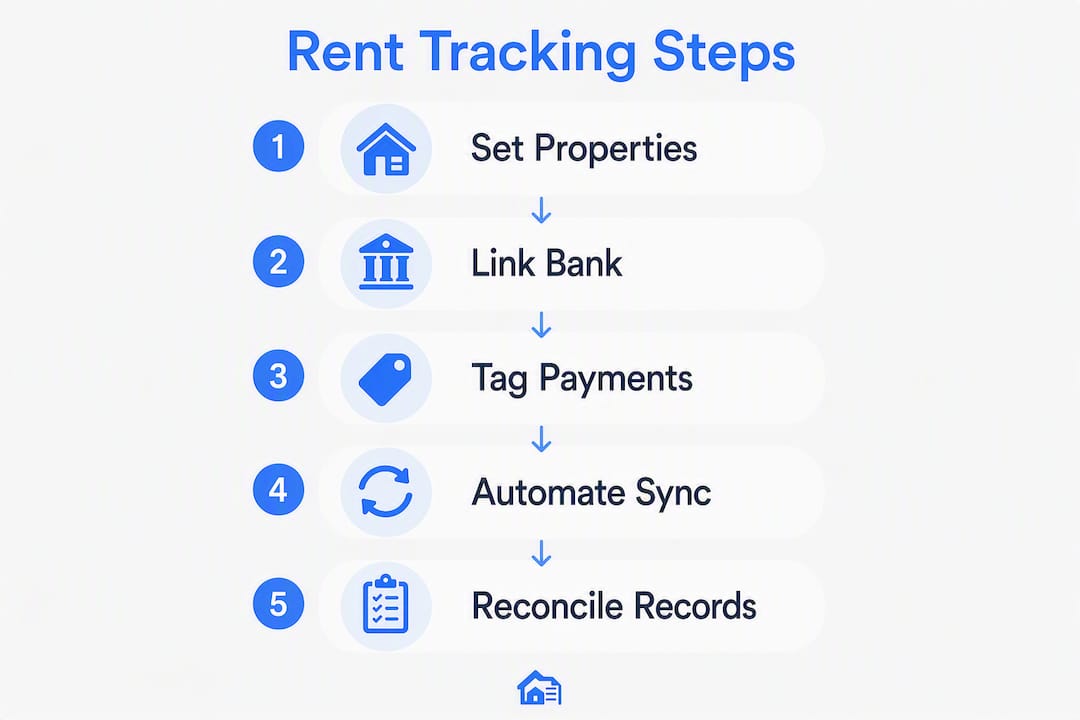
- Connect your bank account or prepare a CSV import. If using a bank-sync tool, authorize the connection and pull the last 90 days of transactions. If not, export a CSV from your bank and import it.
- Tag existing transactions by property ID. Match each deposit to its property and tenant. This is the most time-consuming step the first time; it takes minutes each month after that.
- Set up tenant identifiers. In your ledger, each row should include the tenant name and property ID so you can filter by either.
- Configure recurring payment reminders. Set up email or text reminders to go out 3–5 days before rent is due. Most portals and some spreadsheet tools support this.
- Test with last month’s deposits. Reconcile one prior month manually against your bank statement before going live. This catches tagging errors early.
- Add late-fee rules and receipt automation. Document your late-fee policy in the ledger and configure automatic receipt generation if your tool supports it.
- Tag multi-source income separately. If a property earns income from Airbnb, VRBO, or direct short-term bookings, create a source column and import platform CSVs to keep net income accurate.
Pro Tip: Run a parallel manual reconciliation for the first 30–60 days after connecting a bank sync. Keeping three months of reconciled records during cutover catches early mapping errors before they compound.
How do you reconcile payments and keep records audit-ready?
Reconciliation is the step most landlords skip, and it is exactly where errors accumulate into tax problems. Here is the process, period by period.
- Import or sync bank transactions for the period (monthly is standard).
- Match each deposit to a ledger entry. Every deposit should correspond to a tenant, a property ID, and a due date. Use your property tags to filter.
- Flag unmatched items. Deposits with no matching ledger entry might be security deposit returns, late fees, or errors. Tag them immediately rather than leaving them unresolved.
- Resolve discrepancies. Common causes: timing differences (check mailed late), processing fees netted from ACH deposits, or chargebacks on card payments. Record fees as separate line items, not as rent reductions.
- Generate per-property monthly reports. Export or print a summary showing gross rent collected, fees, net income, and any outstanding balance per property.
- Archive bank statements and receipts. The IRS recommends keeping rental income records for at least three years; many tax professionals suggest seven for properties with depreciation claims.
Sample per-property monthly export layout:
| Column | Example Value |
|---|---|
| Property ID | 123Main-1A |
| Tenant | J. Rivera |
| Date Received | March 5, 2026 |
| Payment Method | ACH |
| Platform Fee | $0 |
| Late Fee | $0 |
| Balance | $0 |
| Notes | On time |
For multi-source income, add a “Source” column (Long-Term, Airbnb, VRBO, Direct) and a “Platform Fee” column. Record platform fees as expenses, not as rent reductions, so your gross rental income on Schedule E is accurate.
Tax note: Schedule E requires gross rents received, not net. Keep your bank statements and individual receipts as supporting documentation. A well-maintained per-property ledger makes this a copy-paste job at tax time rather than a reconstruction project.
What does it cost, and how long does setup take?
The honest answer: you can start for free this afternoon, or spend $200/month on a full platform. Neither extreme is right for every landlord.
Cost ranges by method:
- DIY spreadsheet: Free. Add a bank-sync tool and you are at roughly $4.99 per month. Total annual cost: under $60.
- Mid-tier rent-tracking tools or add-ons: $10–$50 per month. These typically include online payment collection, automated receipts, and basic reporting.
- Integrated property-management platforms: $50–$200+ per month, often priced per unit. These make sense when the time you spend on manual reconciliation costs more than the subscription.
Time-to-value timeline:
- This afternoon: Download the rent ledger template, enter your properties and tenants, reconcile last month.
- 1–2 days: Connect a bank sync, tag existing transactions, verify against bank statements.
- 1–4 weeks: Set up recurring payments, configure tenant reminders, train a property manager on the system.
- 1–3 months: Complete historical reconciliation, clean up prior-year records, establish a monthly bookkeeping cadence.
Hidden costs to watch for:
- ACH processing fees (typically $0.25–$2.00 per transaction, depending on the portal)
- Card payment fees (often 2.5–3.5% per transaction, which must be tracked separately from rent received)
- Lockbox fees if your bank offers paper-check processing
- Bookkeeping time, which is a real cost even when you do it yourself
Pro Tip: Start with the free spreadsheet option and a bank sync. Upgrade to a paid platform only when you hit a genuine friction point: reconciliation taking more than four hours a month, or errors causing missed deductions. Buying a $150/month platform for three units is usually overkill.
Why bank-sync automation gives you a clearer picture of your portfolio
Moving from manual entry to bank-sync automation is the single most effective step for seeing which properties are actually performing versus which ones you assume are fine. The difference is not subtle.
Automating bank-account sync into a spreadsheet costs about $4.99 per month versus a significantly higher monthly cost for a full property-management platform. For landlords managing 2–15 units who do not need tenant portals or maintenance ticketing, that gap is hard to justify closing.
The practical advantage: once transactions import automatically and you tag them by property ID, a SUMIF formula gives you cash flow per property in real time. You stop guessing which unit is underperforming and start seeing it in the numbers. A master spreadsheet with a “Property” column and SUMIF aggregation builds a portfolio dashboard that scales as you add units.
Sample cost comparison:
| Approach | Monthly Cost | Setup Time | Reconciliation Accuracy |
|---|---|---|---|
| Manual spreadsheet | Free | 1–2 hours | Moderate (human error risk) |
| Bank-synced spreadsheet | ~$4.99/month | Half a day | High |
| Integrated PM platform | $50–$200+/month | 1–4 weeks | Very high |
The implementation detail most landlords miss: your property ID must be stable and consistent. “123 Main St #1A” and “123 Main #1A” are two different filter values. A standardized address plus unit suffix as your unique key prevents filter fragmentation as your portfolio grows.
Pro Tip: For the first 30–60 days after enabling bank sync, run a manual reconciliation in parallel. Compare the automated totals to your bank statement line by line. This catches column-mapping errors before they affect a full quarter of records.
Key Takeaways
A bank-synced ledger tagged by property ID is the fastest path to accurate, tax-ready rent records across multiple properties, and you can have one running today with a free template. The typical cost for a bank-sync tool is about $4.99 per month as of July 2026.
| Point | Details |
|---|---|
| Bank sync beats manual entry | Automating imports at ~$4.99 per month removes transcription errors and surfaces per-property cash flow. |
| Property IDs are the foundation | A stable naming convention (e.g., “123 Main St #1A”) keeps SUMIF filters accurate as your portfolio grows. |
| Reconcile every period | Match deposits to ledger entries monthly; keep bank statements and receipts for at least three years. |
| Start free, scale when needed | A spreadsheet plus rent ledger template covers most landlords up to 10 units; upgrade when reconciliation exceeds 4–6 hours/month. |
| Landlordforms accelerates setup | The free rent ledger template gives you a working per-property ledger in minutes, with automated receipts available on paid tiers. |
The system that actually fits your situation
Solo landlords with one or two units often overcomplicate this. A bank-synced spreadsheet and a downloaded rent ledger template cover everything: who paid, when, how much, and what is still owed. The template takes five minutes to set up. The bank sync takes an afternoon. That is a working system, and it costs about $4.99 per month—less than a typical streaming subscription.
The calculus shifts around 10 units, or sooner if your income comes from multiple platforms. At that point, the real problem is not tracking payments; it is reconciling them across sources without introducing errors. Dedicated trackers that import CSVs from Airbnb and VRBO and separate platform fees solve that problem in a way a general spreadsheet cannot, at least not without significant formula work.
The transition signal most landlords ignore: when your monthly reconciliation takes more than four to six hours, or when a missed deduction shows up at tax time because a fee was recorded as a rent reduction, you have outgrown your current system. That is the moment to move up, not before.
For managers with 10+ units and a team, role-based access and a dedicated property management workflow matter as much as the ledger itself. A bookkeeper who can view payment records without touching lease documents or bank credentials is a basic operational control. Build it in from the start.
Landlordforms makes rent tracking practical for small landlords
Eight hours a week is what landlords managing multiple properties typically spend on paperwork, manual entry, and chasing down payment records. Landlordforms cuts that significantly by putting rent ledgers, automated receipts, and document generation in one place, built specifically for portfolios of 1–150 units.

The rent ledger template is free to download and ready to use in Excel today. It covers every column covered in this article: property ID, tenant, due date, amount received, balance, and notes. On paid tiers, Landlordforms automates receipt generation at the moment of payment, organizes tenant and property data, and produces the export formats your accountant actually needs at tax time. State-specific document compliance is built in, so notices and lease agreements stay current without manual research.
If you are ready to move beyond a basic spreadsheet, the full tools page shows what is available across subscription tiers. Start with the free template and upgrade when the automation earns its cost.
Useful sources
These are the primary sources used for this article. Each is worth bookmarking if you are implementing a rent-tracking system.
- Rental Income Tracker for Landlords — RentalReportLab’s documentation on multi-source income tracking, CSV imports from short-term platforms, and fee separation. Useful for mixed-portfolio landlords.
- Landlordforms Rent Ledger Template — Free Excel download with per-property columns; the fastest way to get a working ledger today.
- Landlordforms Templates Library — Full library of landlord documents including receipts, notices, and checklists for recordkeeping and compliance.
- Audit-Proof Rental Property Documents — Guidance on structuring records to withstand an IRS audit, including retention timelines and document organization.
Before relying fully on automation: export three months of bank transactions and reconcile them manually against your ledger. Most banks offer CSV export directly from the account portal. This one step catches mapping errors before they affect a full quarter of records.
FAQ
What is the simplest way to track rent payments for multiple properties?
A bank-synced spreadsheet with a “Property” column and SUMIF formulas is the simplest reliable method for most landlords. Download a rent ledger template, connect your bank, and tag each deposit by property ID.
How do I handle partial or late payments in my rent ledger?
Record partial payments as a separate row showing the amount received and the remaining balance. Log late fees as their own line item so your ledger reflects what was owed versus what was collected.
Can I track rent payments from Airbnb and VRBO in the same ledger?
Yes. Add a “Source” column and import platform CSVs to separate short-term rental payouts from long-term rent. Record platform fees as expenses, not rent reductions, so your gross rental income stays accurate for Schedule E.
How long does it take to set up a working rent-tracking system?
Most landlords have a working ledger in an afternoon using a free template. Adding bank sync takes another half day. Full historical reconciliation for prior months typically takes one to three months.
Does Landlordforms offer a rent ledger template?
Yes. Landlordforms provides a free Excel rent ledger template with per-property columns, and paid tiers add automated receipt generation and document management for landlords managing up to 150 units.