Why Property Managers Track Deadlines: Avoid Fines and Lost Revenue

Property managers track deadlines to protect revenue, avoid regulatory fines, and preserve negotiation leverage. A missed lease expiration can trigger an automatic renewal on unfavorable terms. An expired certificate of insurance can expose an owner to uncovered liability the day after an incident. These are not edge cases — they are the predictable consequences of treating compliance dates as a memory exercise instead of a managed system.
The core fix is straightforward: build one centralized source of truth, assign a named owner to every tracked item, and configure automated alerts early enough to act. The sections below show exactly which deadlines carry the largest risk, what missed dates typically cost, and how to implement a tracking system this week.
The short version:
- Missed lease renewal windows create holdover tenancies and strip negotiation leverage
- Expired vendor COIs and permits create direct liability and code-enforcement exposure
- Fines, lost rent escalations, and legal fees are the most common financial consequences
- A centralized system with automated alerts at 90/60/30/14/7 days prevents silent failures
- Start with the next 90 days of expirations — that alone cuts near-term risk significantly
Table of Contents
- Why property managers track deadlines: financial, legal, and operational impacts
- Which deadlines should you track first?
- What actually happens when deadlines are missed?
- Best practices for tracking deadlines effectively
- What alert schedule actually works?
- Spreadsheets vs. dedicated software: which one fits your portfolio?
- Who owns what? Roles and a simple onboarding timeline
- 7 steps to reduce missed deadlines this week
- Key Takeaways
- The case for treating missed deadlines as a system problem
- Landlordforms makes deadline tracking manageable for small portfolios
- Further reading and useful sources
- FAQ
Why property managers track deadlines: financial, legal, and operational impacts
The financial case is direct. When a rent escalation clause passes unnoticed, the increase is gone — you cannot retroactively collect it. When a lease expires without a renewal notice, many states default to a month-to-month holdover at the existing rate, removing any leverage to renegotiate terms or recover vacancy costs. Critical date management prevents exactly these outcomes: lost renewal rights, forced relocations, unexpected rent gaps, and legal disputes that could have been avoided with a two-week heads-up.
The legal exposure is less obvious but often more expensive. A vendor’s general liability certificate expires quietly. Nobody notices until a contractor causes property damage and the owner’s claim is denied because the COI on file was three months stale. Safety inspection deadlines, rental license renewals, and elevator certifications carry similar risk: the penalty is not just a fine but potential shutdown orders and personal liability.
Missed deadlines are rarely caused by carelessness. They happen because the system relies on memory, scattered calendars, and email threads instead of a single source of truth with clear ownership and automated escalation.
Operationally, the hidden cost is coordination time. When a deadline is missed, the recovery work — tracking down documents, notifying owners, engaging attorneys, and preparing audit responses — consumes hours that compound across a portfolio. Fragmented paper records make this worse by burying critical dates inside lease files that nobody reviews until a problem surfaces.

Which deadlines should you track first?
Not all deadlines carry equal risk. Prioritize by consequence, not by category.
Lease-related (highest exposure):
- Lease expiration dates and renewal option exercise windows
- Rent escalation trigger dates and CPI adjustment deadlines
- Notice-to-vacate and notice-to-renew windows (often 30–90 days before expiration)
- Break clause exercise periods
Compliance and documentation:
- Certificates of insurance (COIs) for tenants and vendors
- Safety inspections: fire suppression, elevator, boiler, HVAC
- Rental licenses and operating permits
- Lead paint and habitability certifications
Vendor and contractor:
- Vendor COI renewals and contractor license expirations
- Vendor contract renewal and termination windows
- Staff certifications (e.g., HVAC technician licenses)
Financial and administrative:
- Property tax deadlines and appeal windows
- Warranty expirations on major equipment
- Equipment service intervals (elevators, boilers, generators)
Pro Tip: Attach the actual document — the COI PDF, the inspection report, the signed lease — directly to each deadline record. When an incident occurs or an auditor asks, you have the evidence in one click rather than a frantic search through email.
What actually happens when deadlines are missed?
Short examples make the risk concrete.
Scenario 1: Missed renewal notice. A property manager oversees a 40-unit portfolio. A commercial tenant’s lease expires in 90 days, but the renewal notice window — requiring 60 days’ written notice — passes unnoticed. The tenant stays on a month-to-month holdover. The owner loses the ability to negotiate a rent increase or a longer term. The tenant eventually vacates with 30 days’ notice, leaving a vacancy the owner had no time to market. The lost revenue from a single missed notice window can easily exceed several months of rent.
Scenario 2: Expired vendor COI. A plumbing contractor’s general liability certificate expired two weeks before a pipe burst caused water damage to three units. The owner’s insurance carrier denied the subrogation claim because the contractor’s coverage had lapsed. The owner absorbed the repair cost directly. The audit trail gap — no current COI on file — also complicated the owner’s own policy renewal.
A two-day action window missed on a Tuesday can create a two-week delay by Friday. One late deliverable blocks the next, and the cascade compounds faster than most managers expect.
The cascade effect is real. A missed inspection triggers a re-inspection requirement. The re-inspection requires a contractor visit. The contractor visit requires scheduling. Scheduling takes a week. Meanwhile, the unit sits offline. Tenant communication records that document the timeline become critical when owners ask why the delay happened.
Best practices for tracking deadlines effectively
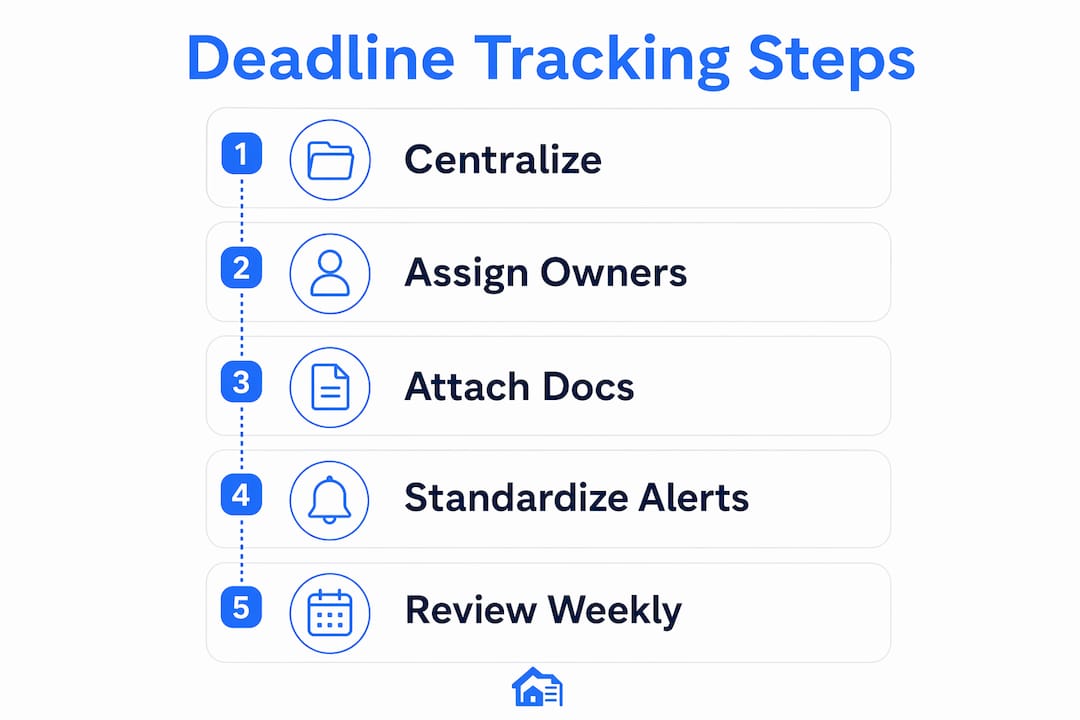
1. Centralize into one system. Dates scattered across personal calendars, email reminders, and shared spreadsheets are a liability. Centralized expiry tracking converts passive records into proactive alerts with accountability logs. Every deadline lives in one place, visible to the whole team.
2. Assign named owners and backups. “The team” owns nothing. Every tracked item needs one named owner and one backup. When the primary is out, the backup receives the alert and knows the escalation path. This eliminates the most common failure mode: an alert that fires into a shared inbox and gets ignored.

3. Attach documents to each record. A deadline without its supporting document is half-useful. Attach the COI, the signed lease, the inspection report, or the permit directly to the corresponding record. This creates an audit-ready trail and eliminates the “I can’t find the file” problem during disputes.
4. Standardize lead times. Set alerts early enough to complete the actual work: review, approval, issuance, and delivery. Alerting on the expiry date itself is almost always too late.
5. Schedule regular portfolio reviews. A weekly 15-minute review of near-term items catches anything the automated alerts missed. Monthly owner-facing compliance reports build trust and reduce reactive calls.
What alert schedule actually works?
Behavioral research shows that distant deadlines cause procrastination while proximal ones inspire action. The practical implication: a single alert 90 days out will be ignored by most people. A sequence of alerts at decreasing intervals keeps the item salient and creates urgency at the right moment.
Chunking — breaking a complex renewal or filing into smaller steps, each with its own alert — increases completion rates. High-school seniors who used an app that chunked the FAFSA process and set a deadline for each step were 22 percent more likely to complete it and 80 percent more likely to receive federal aid. The same principle applies to lease renewals and permit filings.
The critical rule: track the last actionable date, not just the expiry. If a COI takes five business days to reissue, your “last actionable date” is at least seven calendar days before expiry. Set your earliest alert accordingly.
| Deadline Type | Alert Intervals | Notes |
|---|---|---|
| Lease expirations / renewal options | 180 / 90 / 60 / 30 / 14 days | Long lead for negotiation and notice windows |
| COIs (tenant and vendor) | 90 / 60 / 30 / 14 / 7 days | Allow issuance time; chase vendor at 14 days |
| Safety inspections and permits | 90 / 60 / 30 / 14 / 7 days | Scheduling and contractor lead time |
| Tax deadlines and appeal windows | 90 / 60 / 30 / 14 days | Fixed government deadlines; no extensions |
| Equipment service intervals | 60 / 30 / 14 days | Vendor scheduling buffer |
Pro Tip: Configure a “no-acknowledgment escalation” rule: if the primary owner does not mark an alert as seen within 48 hours, the system automatically notifies the backup and the operations director. This one rule eliminates the “I didn’t see it” failure mode.
Spreadsheets vs. dedicated software: which one fits your portfolio?
Spreadsheets work — until they don’t. For portfolios under roughly 25 units with a single manager, a well-structured spreadsheet with calendar reminders is manageable. Beyond that, spreadsheets become unreliable: they lack automated reminders, version control, and audit logs. Multiple people editing the same file creates version conflicts. Dates buried in long lease texts get missed. Actions tracked only in email threads disappear when someone leaves.
Signs you have outgrown a spreadsheet:
- More than one person edits the tracking file
- You have missed a deadline in the past 12 months
- You cannot produce a compliance report for an owner in under 10 minutes
- Vendor COI collection requires manual email follow-up every cycle
What to look for in a dedicated system:
- Automated multi-channel alerts (email, SMS, in-app)
- Per-deadline document storage and version history
- Named ownership and escalation rules
- Owner-facing reporting
- Vendor COI auto-chase
Migration tip: Do not try to upload your entire historical archive at once. Start with every expiration in the next 90 days, get those records clean and owned, then backfill older items over time. You get immediate risk reduction without the upfront workload of a full migration.
A property manager paperwork system that replaces memory-based tracking with structured records is the single highest-leverage change most small portfolios can make.
Who owns what? Roles and a simple onboarding timeline
Clear ownership is the difference between a system that works and one that looks good on paper.
| Role | Responsibility | Escalation |
|---|---|---|
| Operations director | System owner; receives unacknowledged escalations | Final decision-maker |
| Property manager | Day-to-day owner of lease and compliance deadlines | Escalates to operations director |
| Maintenance / vendor coordinator | Owns vendor COIs, contractor licenses, service intervals | Escalates to property manager |
| Owner / investor | Portfolio view; receives monthly compliance reports | No action required unless flagged |
Onboarding timeline:
- Days 0–7: Export all expirations in the next 90 days. Assign an owner and backup to each. Flag any items already past due.
- Days 7–30: Configure your tracking system, attach available documents to each record, and set alert sequences.
- Days 30–90: Backfill older expirations, establish a weekly review cadence, and send the first owner-facing compliance report.
The workflow efficiency gains from this structure compound quickly. Within 60 days, most teams report that reactive scrambles drop sharply because problems surface weeks earlier.
7 steps to reduce missed deadlines this week
- Export or list every expiration in the next 90 days across leases, COIs, permits, and vendor contracts.
- Assign a named owner and a backup to each item; document the escalation path.
- Set at least two automated alerts per item (minimum: 30 days and 7 days before the actionable date).
- Attach available documents — COIs, permits, signed leases — to each corresponding record.
- Configure escalation rules so unacknowledged alerts notify the backup within 48 hours.
- Run a single portfolio compliance report and share it with property owners.
- Schedule a weekly 15-minute team review to clear near-term items and catch anything the alerts missed.
Key Takeaways
Tracking deadlines is the single most cost-effective risk-management habit a property manager can build — it prevents revenue loss, legal exposure, and negotiation failures that are almost entirely avoidable.
| Point | Details |
|---|---|
| Financial risk is immediate | Missed escalations and renewal windows cost real revenue that cannot be recovered retroactively. |
| Alert cadence matters | Use 90/60/30/14/7-day intervals and track the last actionable date, not just the expiry. |
| Ownership prevents silent failures | Every deadline needs a named owner, a backup, and an escalation rule for ignored alerts. |
| Start with the next 90 days | Prioritizing near-term expirations gives immediate risk reduction without a full system overhaul. |
| Landlordforms supports the process | Landlordforms centralizes tenant records, attaches documents, and automates deadline reminders for portfolios up to 150 units. |
The case for treating missed deadlines as a system problem
Most teams that miss deadlines are not careless. They are running on a system that was never designed to catch what it needs to catch. A shared spreadsheet with no alerts, no ownership rules, and no escalation path will fail — not because the people using it are negligent, but because the system itself is passive.
The framing shift that matters most: a missed deadline is a process failure, not a moral one. When you diagnose it that way, the fix becomes obvious. You do not need to hire better people or work harder. You need a system that assigns ownership, fires alerts early enough to act, and escalates automatically when nobody responds.
Landlordforms was built around exactly this premise: that small landlords and property managers should not need a compliance department to stay on top of their obligations. The tools and templates it provides are designed to replace memory-based tracking with structured, documented processes that hold up under scrutiny.
If the 7-step checklist above feels like a lot, start smaller. Pick the three expirations most likely to cause a problem in the next 30 days. Assign an owner. Set two alerts. Attach the document. That is a real system, even if it covers only three items. Build from there.
Landlordforms makes deadline tracking manageable for small portfolios
Eight hours a week is what property managers commonly recover when they replace manual paperwork with a structured system. Landlordforms is built for landlords managing 1 to 150 units who need centralized tenant records, automated document generation, and deadline reminders without the complexity of enterprise software.

The platform maps directly to the practices in this article: tenant information in one place, documents attached to records, automated reminders for rent and lease events, and templates for 30-day notices and rent receipts that reduce the risk of errors on time-sensitive communications. It is not a full compliance platform for a 500-unit portfolio — but for the landlord who currently tracks everything in a spreadsheet or a notes app, it closes the gap that causes most missed deadlines.
Start with the free rent ledger template to get your rent tracking organized, then explore the full suite of landlord tools to see where automation can replace your current manual steps.
Further reading and useful sources
- Why Property Managers Need Centralized Expiry Tracking — covers the case for moving from passive spreadsheets to proactive alert systems
- Compliance Software for Property Managers: Why Spreadsheets Break at 25+ Units — practical breakdown of spreadsheet failure modes and migration signals
- How to Track Critical Lease Dates Across a Portfolio — explains the “last actionable date” model and portfolio-scale failure patterns
- What Is Critical Date Management in CRE, and Why Does It Matter? — financial and negotiation consequences of missed critical dates
- Audit Trail Property Management: A Practical 2026 Guide — partner guide on building document-attached audit trails
- Property Management Audit Checklist — partner checklist for audit preparation and evidence collection
- Property Management Workflow Efficiency Tips That Work — practical workflow improvements for organized deadline tracking
- How Digital Tenant File Management Works for Landlords — document attachment and audit trail setup for tenant records
FAQ
Why do property managers track deadlines?
Property managers track deadlines to prevent revenue loss, legal penalties, and loss of negotiation leverage. Missed lease expirations, expired COIs, and overdue inspections create financial and liability consequences that are almost entirely avoidable with a centralized tracking system.
What happens if a lease renewal deadline is missed?
Most states default to a month-to-month holdover tenancy when a lease expires without proper notice, stripping the owner of leverage to renegotiate rent or terms. The tenant can then vacate with as little as 30 days’ notice, leaving no time to market the unit.
What is the 80/20 rule in property management?
In property management, the 80/20 principle generally holds that a small portion of properties or tenants generate most problems and management time. Applying it to deadline tracking means prioritizing the lease events and compliance items that carry the largest financial or legal consequence rather than treating every date equally.
What are red flags when evaluating a property manager’s compliance process?
Key red flags include tracking deadlines in personal email or a shared spreadsheet with no alerts, no named ownership for compliance items, inability to produce a current COI for any vendor on short notice, and no documented escalation path when an alert is ignored.
How far in advance should property managers set deadline alerts?
For lease expirations, alerts at 180, 90, 60, 30, and 14 days give enough lead time for negotiation and notice delivery. For COIs and permits, a 90/60/30/14/7-day sequence allows time for issuance and vendor follow-up. The key is alerting on the last actionable date, not the expiry date itself.