Error-Free Tenant Document Generation: A Practical Playbook

The fastest way to produce error-free tenant documents is a template-driven automation workflow that pulls verified tenant and property data, enforces required fields, and records an auditable signing trail. That single shift eliminates the most common and costly documentation failures: wrong names on leases, missing state disclosures, unsigned addenda, and mismatched deposit amounts.
Why the switch pays off immediately:
- Fewer errors at the source. Merge fields pull data once from a verified record; no one rekeys a tenant’s name six times across six forms.
- Consistent disclosures, every time. Conditional logic inserts the right state clauses automatically, so a California lead-paint addendum never ends up on a Texas lease.
- A defensible audit trail. Every generated document carries a version ID, a timestamp, and eSign evidence, which matters when a Fair Housing complaint or FCRA dispute arrives.
- Speed. Physical paperwork slows landlords and adds hours per lease cycle; automation compresses that to minutes.
Your immediate next step: before you buy or build anything, run a 60-second file audit on one recent applicant. Pull the file and check whether every required field is present, every required disclosure is signed, and the document version matches what the tenant received. If you find a gap in under a minute, you have your business case.
Table of Contents
- What does a complete error-free tenant document generation solution include?
- How automation actually removes human error from your documents
- How do integrations and data sources fit into the workflow?
- How should your templates handle state-specific clauses and signing formats?
- What does a realistic rollout look like, and what will it cost?
- What do FCRA, Fair Housing, and document retention require from you?
- How do you test generated documents before going live?
- What does real-world automation look like in practice?
- Key Takeaways
- Why most landlords are solving the wrong problem
- Landlordforms covers the full document workflow for small portfolios
- Useful sources
- FAQ
What does a complete error-free tenant document generation solution include?
A capable automation solution is more than a template editor. It is a system that controls data quality from the moment an applicant submits information through to the archived, signed PDF. According to DiscoveryMark’s property documentation guidance, many landlords cover only part of the documentation lifecycle and lack a single per-unit audit-ready file. The right solution closes that gap.
Core features to require:
- State-specific template library with locked legal text and editable merge fields
- Conditional logic that inserts or suppresses clauses based on state, unit type, or applicant profile
- Field validation and required-field enforcement so no document can be generated with a blank rent amount or missing lease start date
- Version control with a unique document ID on every generated output
- eSignature capture with ESIGN/UETA-compliant authentication metadata
- Immutable audit logs recording who generated, edited, sent, and signed each document
Data quality and mapping:
- Tenant data should flow from a single verified source (application form or property management system) into every document, not be retyped per form
- FCRA §1681b(b)(2)(A) requires a separate, standalone consent before you order any consumer report; that consent must be captured and stored as its own document
- Property and unit fields (address, unit ID, rent amount, security deposit) should be defined once in a canonical data model and referenced everywhere
Operational features that matter at scale:
- Role-based access so only authorized staff can edit master templates
- A centralized per-unit tenant file that aggregates every generated document into one audit-ready output
- Change history on templates so you know exactly which version was active when a lease was signed
These features map directly to the three outcomes that matter most: fewer typos, consistent disclosures, and a file that holds up in a Fair Housing or FCRA review.
How automation actually removes human error from your documents
Manual document creation fails at predictable points. Someone copies last month’s lease and forgets to update the rent amount. A notice goes out with the wrong notice period because the state changed its statute. A pet addendum gets skipped because the leasing agent was in a hurry. Automation removes each of these failure modes through specific mechanical controls, not just good intentions.
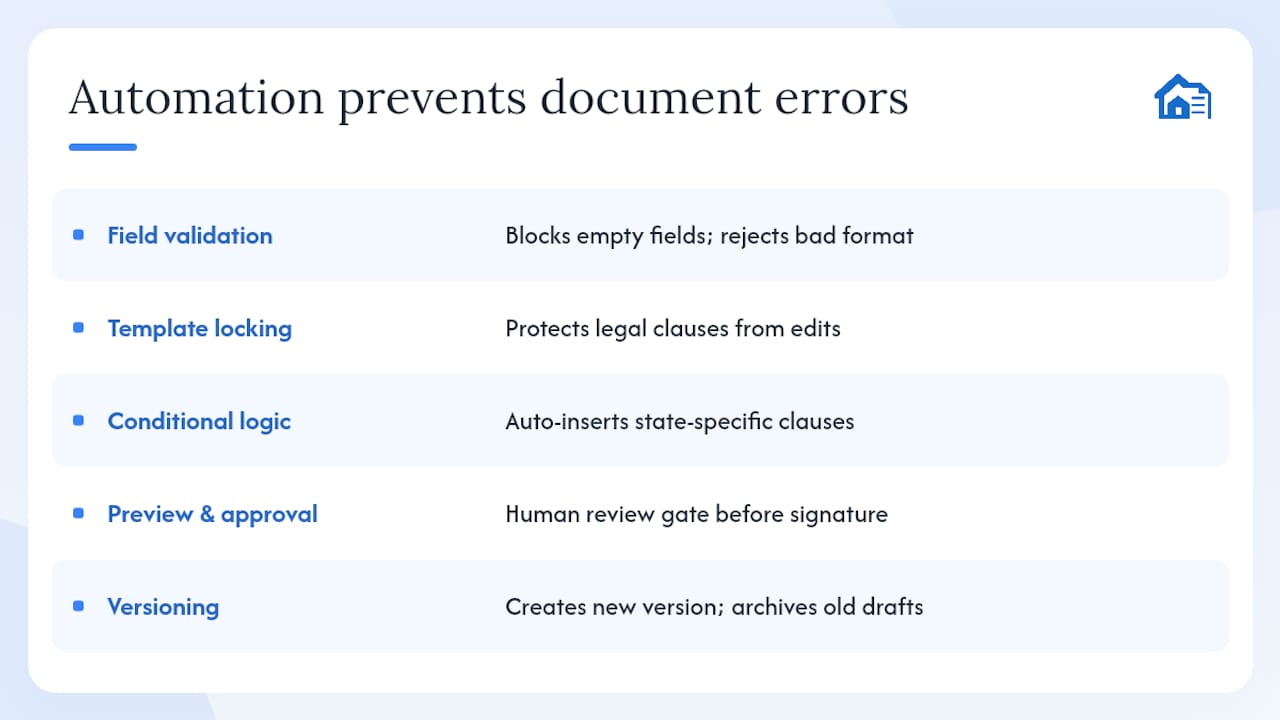
Field validation and required-field enforcement catch the most common broken fields before a document is generated. A system that blocks output when “Lease Start Date” or “Monthly Rent” is empty prevents the blank-field errors that show up in roughly a third of manually assembled lease packets. Validation rules can also check format: a zip code field that rejects letters, a date field that flags a move-in date set in the past.
Merge fields and template locking solve a different problem. When legal clauses live in a locked template layer, no one can accidentally delete a warranty of habitability clause while editing the rent amount. The editable fields are clearly separated from the protected legal text, so the document a tenant signs is always the document the attorney approved.
Conditional logic handles state and situation-specific clauses without requiring the user to know every rule. A template configured for California automatically inserts the required mold disclosure and the AB 1482 rent control notice when applicable. A Texas template omits those and includes the required TREC-aligned language instead. The user selects the state; the system handles the rest.
Preview and approval flows add a human checkpoint before the document reaches the tenant. A staff member reviews the auto-filled output, confirms the data looks right, and approves it for signature. Automated versioning ensures that if a correction is made, the revised document gets a new version ID and the old draft is archived, not overwritten.
Pro Tip: Before any document goes to a tenant for signature, run a 60-second file completeness check: confirm the tenant name, unit address, rent amount, lease dates, and all required state disclosures are present and correct. This single gate catches the errors that slip past automated validation.
How do integrations and data sources fit into the workflow?
The document generation step is only as accurate as the data feeding it. A well-designed workflow connects multiple upstream sources so tenant and property data arrives pre-verified, not manually transcribed.
Typical data sources to connect:
- Essential documents for landlords - SmartScreen
- Property Documentation for Landlords: The Complete Reference (2026) · DiscoveryMark
Field mapping and the canonical data model
Every integration needs a field map: a table that defines which source field populates which document field. The canonical data model should define these once:
| Document Field | Source System | Source Field |
|---|---|---|
| Tenant Legal Name | Applicant Form | full_legal_name |
| Unit Address | PMS | unit.address |
| Monthly Rent | PMS | unit.current_rent |
| Security Deposit | PMS | unit.deposit_amount |
| Lease Start Date | PMS | lease.start_date |
| FCRA Consent Date | Consent Form | consent.signed_at |
Practical workflow, step by step:
- Applicant submits intake form; data enters the system and creates a tenant record.
- Standalone FCRA consent is captured and stored as a separate document before any screening is ordered.
- Screening results return and are linked to the tenant record; adverse action flags are noted.
- Staff selects the document type (lease, notice, addendum) and the system auto-fills all mapped fields.
- Conditional logic applies state-specific clauses based on the unit’s state.
- Staff previews the document, approves it, and sends it for eSignature.
- Signed PDF is archived in the per-unit tenant file with a version ID and timestamp.
Common integration pitfalls to watch for:
- Duplicate tenant IDs when an applicant appears in both the PMS and the screening system under slightly different names. Standardize on one ID field (email or SSN last four) as the match key.
- Address mismatches between the PMS unit record and the applicant’s stated address. Run an address normalization step before populating lease documents.
- Stale data when a rent amount changes in the PMS but the document template caches the old value. Always pull live from the source at generation time, not from a snapshot.
APIs that connect document generation tools to a PMS or CRM can auto-fill templates and output state-compliant PDFs ready for eSign, cutting the manual transcription step entirely. Some teams are now using AI agents that pull tenant data from a spreadsheet or database and batch-generate signable agreements, which is a useful pattern for high-volume onboarding periods.
How should your templates handle state-specific clauses and signing formats?
Template architecture determines whether your documents hold up legally. A flat, one-size-fits-all lease template is a liability. A well-structured template separates three layers: locked legal text, conditional clause blocks, and editable data fields.
Template structure:
- Locked legal text contains jurisdiction-specific statutory language that no user can edit. This layer is approved by counsel and frozen until a formal template update.
- Conditional clause blocks are inserted or suppressed based on rules. A pet policy clause appears only when the applicant record flags a pet. A lead-paint disclosure appears only for pre-1978 units. A security deposit interest clause appears only in states that require it.
- Editable data fields are the merge fields: names, dates, amounts, addresses. These are the only parts a user touches.
State-specific concerns that templates must address:
- Security deposit caps vary by state (California caps at one month’s rent for unfurnished units; other states allow two or three months). The template should pull the applicable cap from a state rules table and validate the entered deposit against it.
- Required disclosures differ significantly: some states mandate a move-in checklist, others require a specific mold or bedbug notice, and several require a summary of tenant rights. State-specific lease generators can auto-include these clauses, but the underlying template library still needs periodic legal review to catch local ordinance changes.
- Notice periods for termination and rent increases vary from 30 to 90 days depending on state and tenancy length. Conditional logic should select the correct period automatically.
Signing and output formats:
- Generate final documents as PDFs, not editable DOCX files. A PDF locks the content at the moment of signing.
- eSignatures are legally sufficient when ESIGN/UETA conditions are met: the signer must consent to electronic signing, the system must capture authentication metadata (IP address, timestamp, email verification), and the signed record must be stored and retrievable.
- Keep the signed PDF as the source of truth. Do not allow post-signature edits; if a correction is needed, void the document and generate a new version.
Pro Tip: Stamp every template with a version number (e.g., CA-LEASE-v2.4) and maintain a change log that records what changed, when, and why. Every generated lease then carries that version ID in its metadata, so you can reconstruct exactly which template was active on any given signing date.
What does a realistic rollout look like, and what will it cost?
A phased rollout reduces risk and gives your team time to validate the system before it touches every lease.
Phase 1: Preparation (1–2 weeks)
- Inventory every document type you currently generate (leases, notices, addenda, move-in checklists, rent receipts).
- Build the canonical field list: every data point that appears in any document, mapped to its source system.
- Define decision rules for conditional logic (which clauses apply in which states, which addenda trigger on which applicant attributes).
- Select your automation tool and confirm it covers your states.
Phase 2: Pilot (2–4 weeks)
- Configure templates for one property or one document type.
- Run 10 test applicants end-to-end: intake, consent, screening, document generation, eSign, archive.
- QA every output against the checklist in Section 8.
- Train the staff who will use the system daily.
Phase 3: Rollout and ongoing management
- Freeze template edits during active lease cycles; schedule update windows between cycles.
- Run a 30/60/90-day review: check error rates, missing-field flags, and staff adoption.
- Set a calendar reminder for annual template reviews to catch state law changes.
Cost and ROI:
Pricing models for document automation tools typically follow one of three shapes: per-unit monthly tiers (common for property management-focused tools), per-document fees (common for high-volume transactional tools), or fixed seat licenses. For a landlord managing 20 units, the math is straightforward: if automation saves 2 hours per new lease and you turn over 8 units a year, that is 16 hours recovered. At a conservative $40/hour value of your time, that is $640 annually before you count the avoided cost of a single compliance error.
Go-live acceptance criteria:
- All required fields validated and enforced in every template
- State-specific clauses confirmed correct for each state in your portfolio
- eSign workflow tested with a real signature capture and archived PDF
- At least one staff member trained and able to generate a document without assistance
What do FCRA, Fair Housing, and document retention require from you?
This is where documentation stops being an operational convenience and becomes a legal obligation. Three frameworks govern how you collect, use, store, and dispose of tenant documents.
FCRA obligations:
- Before ordering any consumer report (credit, criminal, eviction), you must obtain a separate, standalone written consent from the applicant under §1681b(b)(2)(A). This consent cannot be buried in the lease or application; it must be its own document.
- If you take adverse action based on a screening report, you must provide the applicant with the required adverse action notice, the name of the reporting agency, and notice of their right to dispute.
- Under §1681e(b), if a screening report contains an entry that appears obviously inaccurate, you have both the right and the duty to challenge it before acting. Document the reinvestigation request and its outcome in the screening file.
Retention and disposal:
SmartScreen recommends retaining screening consents and reports in an encrypted archive for a minimum of five years, with disposal conducted per the FCRA Disposal Rule, which requires that consumer information be destroyed in a way that protects against unauthorized access (shredding paper, wiping or destroying electronic media).
The screening file completeness doctrine:
Collect the same seven document categories from every applicant, in the same format, every time:
- Rental application and government-issued photo ID
- Income verification (pay stubs, bank statements, or employer letter)
- Credit report with rental-specific scoring
- Criminal background check
- 50-state eviction history
- Employment verification or bank statements
- FCRA standalone consent form
Collecting these consistently from every applicant is as important as applying consistent decision criteria. A Fair Housing complaint is far harder to defend when one applicant’s file has all seven categories and another’s has three.
Operational controls:
- Encrypt documents at rest and in transit
- Restrict access to screening files by role; not every staff member needs to see a credit report
- Maintain audit logs that record every access, not just every generation event
- Document your secure deletion process and keep a deletion log
Pro Tip: When a tenant disputes a screening report entry, document every step: the date you contacted the reporting agency, the agency’s response, and the outcome. Store that reinvestigation record in the tenant’s screening file alongside the original report. If the dispute ever escalates, that paper trail is your defense.
Retention at a glance: SmartScreen’s guidance recommends a five-year encrypted archive for screening artifacts, with disposal per the FCRA Disposal Rule.
How do you test generated documents before going live?
Testing is not optional. A template that works perfectly for a standard applicant can fail on a joint application, a Section 8 voucher holder, or an applicant with an expunged record. Build a test suite that covers the edge cases before they reach a real tenant.
Define your test cases:
- Standard single applicant, no pets, W-2 income
- Joint applicants (two names on the lease)
- Applicant with a pet or assistance animal accommodation request
- Low-income applicant using a housing voucher
- Applicant with an expunged or sealed record that should not appear in the output
- Applicant in a state with unusual disclosure requirements (California, New York, Illinois)
QA checklist for each generated document:
- All merge fields populated with no blank or placeholder text
- Conditional clauses triggered correctly (pet clause present when applicable, absent when not)
- State disclosures match the unit’s state
- Deposit amount within the state’s legal cap
- Lease dates internally consistent (end date follows start date by the correct term)
- eSign fields placed correctly and all required signatories included
- Final PDF is not editable and carries the correct version ID
User acceptance testing:
Have a staff member who was not involved in template setup generate a document from scratch using only the system interface. If they can produce a correct document without coaching, the system is ready. If they need help, the interface or training needs work before rollout.
Automated smoke tests:
After any template update, rerun a set of versioned sample documents and compare the output to the approved baseline. A diff that shows an unexpected clause change or a missing field is a signal to stop and investigate before the updated template goes live. This is the same principle behind reducing human error in tenant notices: catch the problem in testing, not in a tenant’s inbox.
What does real-world automation look like in practice?
A mid-size property management operation managing 80 units across three states faced a recurring problem: lease packets sent to new tenants were missing required state disclosures roughly 20% of the time, and the leasing team was spending an average of 45 minutes assembling each packet manually.
The challenge: Three states, each with different disclosure requirements, handled by a team copying and pasting from a shared folder of Word documents. Version control was nonexistent; no one knew which template was current.

The change: The team migrated to a template-driven automation workflow with state-specific conditional logic. Each unit’s state was stored in the PMS; the document system pulled that field at generation time and inserted the correct disclosure set automatically. Required fields were enforced; the system would not generate a lease without a signed FCRA consent on file.
The outcome: Assembly time per lease packet dropped significantly, from nearly an hour to well under a quarter of that duration. Missing-disclosure incidents dropped sharply to very low levels within the first few months. The team also gained a per-unit audit file for every tenant, which proved useful when one tenant disputed a deposit deduction and the landlord could produce a timestamped, signed move-in checklist within minutes.
The core shift: moving from a shared folder of Word documents to a system where templates are locked, fields are validated, and every output is a versioned, archived PDF. The time savings were real, but the compliance improvement was what mattered most to the owner.
Key Takeaways
Automated, template-driven document generation is the most reliable path to flawless tenant documentation: it enforces required fields, applies state-specific clauses automatically, and produces a versioned, signed PDF that holds up in any compliance review.
| Point | Details |
|---|---|
| Start with a 60-second file audit | Pull one recent applicant file and check for missing fields, disclosures, and version IDs before building anything. |
| Require seven document categories | Collect the same seven screening categories from every applicant to satisfy the file completeness doctrine and reduce Fair Housing risk. |
| Lock templates, validate fields | Conditional logic and required-field enforcement eliminate the most common lease errors before a document reaches a tenant. |
| SmartScreen recommends retaining screening consents and reports in an encrypted archive for a minimum of five years with disposal conducted per the FCRA Disposal Rule. | |
| Landlordforms for small portfolios | Landlordforms automates lease generation, state-specific notices, and per-unit file management for landlords managing 1–150 units. |
Why most landlords are solving the wrong problem
Most landlords who struggle with document errors think the problem is their templates. They spend time reformatting Word documents, adding clauses, and color-coding fields. The templates are rarely the real problem. The real problem is the workflow around the templates: who enters the data, when, from which source, and whether anyone checks the output before it goes out.
A perfect template fed by manually retyped data will still produce errors. A mediocre template connected to a verified data source with required-field enforcement will produce far fewer. The mechanics of error prevention are upstream of the document itself.
The other thing most landlords underestimate is the compliance exposure from inconsistent collection. It is not enough to have a good screening criteria policy. If you collected a credit report from one applicant and skipped it for another because they seemed like a good fit, you have a Fair Housing problem regardless of your intent. Automation enforces consistency not because it is smarter than you, but because it cannot make exceptions unless you explicitly configure them. That constraint is a feature, not a limitation.
One practical note: when you do need to make an exception (a documented waiver for a specific applicant attribute), write the waiver rule down before you apply it, not after. A documented exception is defensible. A retroactive explanation is not. Treat the automation-generated PDF as the source of truth and store it with an immutable version ID. If a dispute arises six months later, that file is your record, and it needs to be exactly what the tenant signed.
Landlordforms covers the full document workflow for small portfolios
Eight hours a week is a lot of time to spend on paperwork for a portfolio of 20 or 30 units. Landlordforms was built specifically for landlords managing 1 to 150 units who need accurate, professional documents without a legal team or a property management enterprise platform.
The platform handles the document types that create the most risk when done manually: 30-, 60-, and 3-day notices, lease agreements, move-in and move-out checklists, rent receipts, violation notices, and eviction paperwork. State-specific templates are built in, so the correct disclosures appear automatically based on your property’s location. eSign is included, with audit logs that capture the signing evidence you need for FCRA and Fair Housing defensibility.
For landlords starting a pilot, the free rent ledger template is a practical first step: it supports per-unit recordkeeping and gives you a clean data foundation before you connect a full automation workflow. Subscription tiers are based on unit count, and free tools are available to test the approach before committing. Start your pilot at landlordforms.io.
Useful sources
- Essential documents for landlords (SmartScreen) — Seven-category screening file framework, five-year retention recommendation, and FCRA Disposal Rule guidance.
- Property Documentation for Landlords: The Complete Reference (DiscoveryMark) — Per-unit audit-ready file structure, four documentation lifecycle jobs, and structured per-event flows.
- Tenant screening documents in 2026 (Landlordforms) — Checklist of mandatory documents to collect from rental applicants.
- Tenant onboarding document checklist (Landlordforms) — Step-by-step onboarding documentation checklist for landlords.
- Digital tenant file management (Landlordforms) — Per-unit file structure and audit readiness guidance.
- Property documentation audit checklist (Landlordforms) — Audit checklist and per-unit evidence requirements for investors.
FAQ
What is the biggest source of errors in tenant documents?
Manual data entry is the leading cause: tenant names, rent amounts, and lease dates retyped across multiple forms. A merge-field system that pulls from one verified source eliminates most of these errors at the root.
Does automation satisfy FCRA consent requirements?
Automation handles the workflow, but the consent itself must still be a separate, standalone document obtained before any consumer report is ordered, per FCRA §1681b(b)(2)(A). A compliant system captures and archives that consent as its own file.
How long should I retain tenant screening documents?
SmartScreen recommends retaining screening consents and reports in an encrypted archive for a minimum of five years with disposal conducted per the FCRA Disposal Rule.
Can Landlordforms generate state-specific lease agreements?
Yes. Landlordforms includes state-specific templates that automatically apply the correct disclosures, deposit rules, and notice periods based on your property’s location, covering the core compliance requirements for landlords managing up to 150 units.
What is the screening file completeness doctrine?
It is the practice of collecting the same seven document categories from every applicant, in the same format, every time. Consistent collection is a Fair Housing risk control: a file that looks different from applicant to applicant is harder to defend than one that follows a documented, uniform process.